MP4 to MP3 Converter
MP4toMP3.io converts MP4 video to MP3 audio inside your browser. Your file stays on your device and is never sent to a server. No signup.
Drop your MP4 here, or choose a file
Extract audio from MP4, MOV, WebM or MKV video as MP3 at 128 to 320 kbps. It stays on your device.
Choose a FileYour browser converts the file. Nothing is sent to a server.
- No signup, no watermark
- Converts on your device
- About 2 sec for a 47 sec clip
- Works offline once loaded
Convert Other Video and Audio Files to MP3 and WAV
MP4toMP3.io has a separate page for each format. Every page uses the same private, in-browser audio converter.
How to Convert MP4 to MP3
Converting MP4 to MP3 takes three steps and no account. Your browser reads the video and writes the MP3, so the file never leaves your device and there is no queue.
- 1
Choose Your Video
The converter accepts MP4, MOV, WebM, MKV and AVI files. Drop a file on the page or tap Choose a File. On a phone, pick the video from your camera roll or Files app. The Paste a Link tab loads a video from a direct file URL.
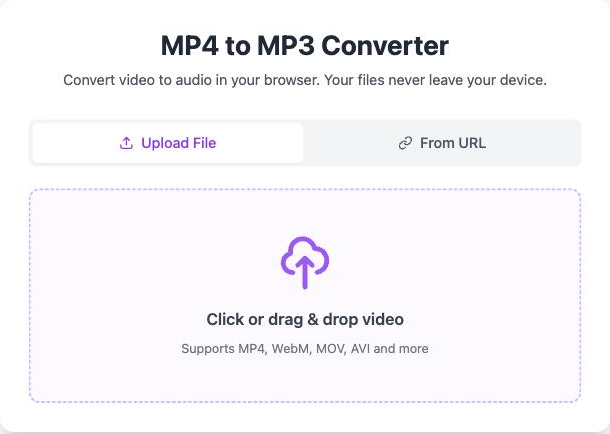
Step 1: the drop zone accepts a video file or a direct link. - 2
Pick Quality and Trim
The default output is MP3 at 192 kbps, which suits music and most recordings. The bitrate buttons offer 128, 192, 256 and 320 kbps. The Trim switch limits the conversion to the audio between a start time and an end time.
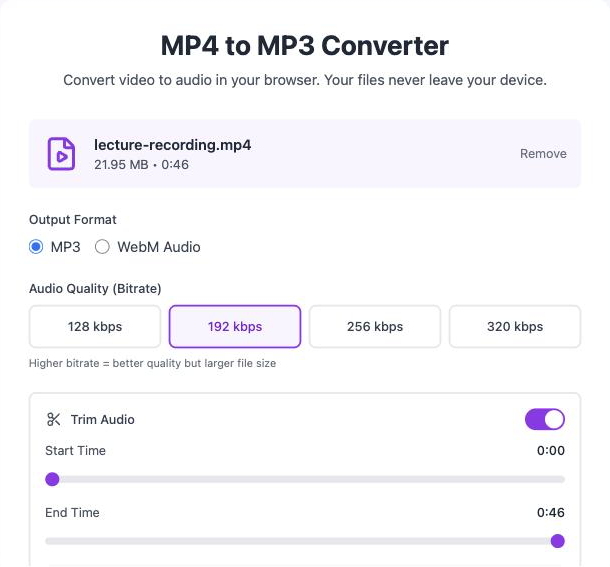
Step 2: MP3 at 192 kbps is preselected; Trim is optional. - 3
Convert and Download
Convert to MP3 decodes the audio track and encodes the MP3 on your device, usually in a few seconds. A preview player lets you check the result. Download MP3 saves the MP3 file under the original name with an .mp3 ending.
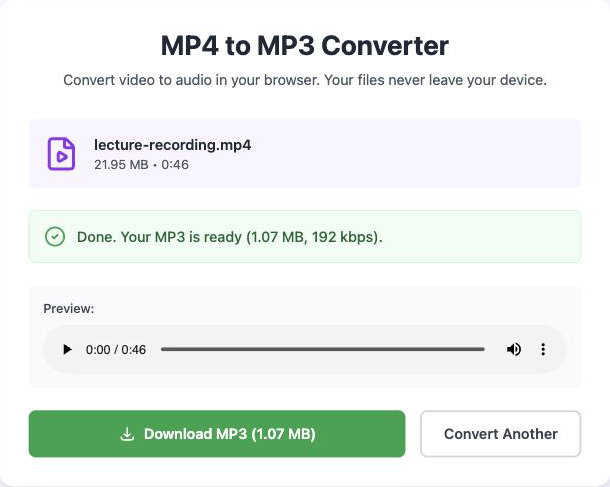
Step 3: a 21.95 MB video became a 1.07 MB MP3.
What You Get When You Extract Audio from MP4 Video
MP4 is a container format that holds a video track, an audio track and sometimes subtitles. MP3 is a compressed audio format that holds sound only. Converting MP4 to MP3 keeps the audio track and drops everything else.
A Much Smaller File
A 10 minute 1080p MP4 is often 300 MB or more. The same 10 minutes as a 192 kbps MP3 is about 14 MB. MP3 files are easier to send, store and play on a phone because they carry no picture.
Audio That Plays Anywhere
MP3 plays on every phone, car stereo, podcast app, music player and voice recorder made in the last twenty years. MP3 needs no codec install and triggers no "unsupported format" message.
Sound You Can Work With
Transcription tools, note-taking apps, podcast hosts and audio editors accept MP3. An MP4 to audio conversion turns a lecture, interview, meeting or voice memo into a file you can listen to on the go or edit later.
A Free Online MP4 to MP3 Converter That Works on Your Device
Most online MP4 to MP3 converters send your video to their server, convert it there, and send the audio back. MP4toMP3.io does the whole job on your device.
| What matters | Upload converters | MP4toMP3.io |
|---|---|---|
| Where your video goes | To a server you do not control, usually kept for hours | Nowhere. It never leaves your device |
| Waiting | Upload the whole video, queue, then download | A few seconds, no queue |
| File size | Caps of 100 MB to 1 GB on free plans | No size cap from us. Your device's memory is the only limit |
| Signup and limits | Daily conversion limits, accounts for larger files | None |
| Private or sensitive recordings | Meetings and interviews sit on someone else's disk | Safe to convert. Nothing is stored |
| Slow or metered connection | A 500 MB video can take longer to upload than to watch | Works with Wi-Fi off once the page has loaded |
Same video, trimmed to 10 seconds: conversion takes 0.75 seconds and the 192 kbps MP3 is 0.23 MB.
Measured on MP4toMP3.io, Chrome on a MacBook, November 2026.
Which MP3 Bitrate to Choose: 128, 192, 256 or 320 kbps
Bitrate is the amount of audio data per second, measured in kilobits per second (kbps). A higher bitrate keeps more detail and makes a bigger file. The converter offers four bitrates.
| Bitrate | Per minute | 5 minutes | Best for |
|---|---|---|---|
| 128 kbps | About 0.9 MB | About 4.8 MB | Speech: lectures, meetings, voice notes, audiobooks. Smallest files, still clear voices. |
| 192 kbps | About 1.4 MB | About 7.2 MB | Music and everyday listening. The default, and the point where most people stop hearing a difference. |
| 256 kbps | About 1.9 MB | About 9.6 MB | Music you care about, on good headphones or speakers. |
| 320 kbps | About 2.3 MB | About 12 MB | Audio you will edit, mix or archive. The highest quality MP3 allows. |
An MP3 cannot sound better than the audio track inside the source video. If the MP4 was recorded at a low bitrate, choosing 320 kbps only makes the file bigger, and 128 or 192 kbps is the sensible choice for that source.
MP4toMP3.io decodes the original audio track once and encodes it straight to MP3, so quality is lost in that one step only. To keep the sound with no further loss, the MP4 to WAV converter saves it as uncompressed WAV.
Trim the Audio Before You Convert to MP3
Trim is a setting that converts only the audio between a start time and an end time. It suits the common case where you want one part of a video, not all of it: a song from a concert recording, one answer from a long interview, the ten minutes of a lecture that matter.
Trimming happens before encoding, so a short clip from a long video converts in a moment, and the MP3 is exactly the length you set. The original video stays untouched.
Convert MP4 to MP3 on iPhone, Android, Mac and PC
The converter runs in Safari on iPhone and iPad, in Chrome on Android, and in Chrome, Edge, Firefox or Safari on Windows, Mac and Linux. It needs no app, no extension and no update.
- iPhone and iPad
Use Safari. Pick the video from your Photos or Files app and save the MP3 to your device.
- Android
Use Chrome. Select a video from your device, convert it and find the MP3 in Downloads.
- Windows PC, Mac and Linux
Use Chrome, Edge, Firefox or Safari. Convert directly in your desktop browser.
The page keeps working without a connection once it has loaded, so you can convert on a plane or with a weak signal. The page weighs under 400 KB and loads in under two seconds on a typical phone network.
MP4 to MP3 Converter: Frequently Asked Questions
Is this MP4 to MP3 converter really free?
Is my video sent to a server?
Is there a file size limit?
How long does it take to convert MP4 to MP3?
Is converting on my device slower than a server?
Which MP3 quality should I choose?
Does converting MP4 to MP3 lose quality?
Can I convert MP4 to MP3 on my phone?
Which video formats can I convert?
Can I convert only part of the video?
Can I convert YouTube videos to MP3?
Do I need to install anything?
Why does the file name end in .webm instead of .mp3?
Ready to Convert MP4 to MP3?
Drop a video at the top. It is free, private and done in your browser in a few seconds.
Convert MP4 to MP3